
Download ColoringMagician – AI Coloring Page Generator, Free & Secure
Overview
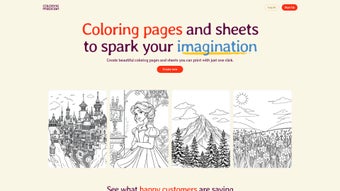
ColoringMagician is a cutting‑edge, AI‑driven web application that transforms the timeless hobby of coloring into a dynamic, on‑demand creative studio. Designed for families, educators, and hobbyists, the platform uses advanced machine‑learning models to generate high‑resolution line drawings in seconds, based on simple keywords, thematic selections, or user‑uploaded reference images. Because the service runs completely in the browser, there is no need for bulky installations, and every operation is performed locally, guaranteeing that personal data never leaves the user’s device. This privacy‑first approach, combined with a completely free, ad‑free experience, makes ColoringMagician especially attractive to schools and community centers that operate under tight budget constraints.
The user interface follows a clean, card‑based layout that guides users through three intuitive steps: choose a theme, input a prompt or image, and click “Generate.” Within a handful of seconds, a crisp vector line art appears, ready for immediate download, printing, or further editing in external graphics tools. The platform supports bulk generation, allowing teachers to produce entire worksheets or themed coloring packs for classroom activities, while parents can quickly craft personalized pages that feature a child’s favorite characters or recent vacation destinations.
Beyond pure entertainment, ColoringMagician serves educational goals. Custom worksheets can reinforce vocabulary, spark storytelling, or develop fine‑motor skills, while the ability to adjust line weight makes the tool suitable for both young children and adult coloring enthusiasts. Regular updates introduce new thematic libraries—ranging from dinosaurs and space adventures to seasonal holidays—ensuring a fresh supply of content that keeps users engaged over the long term. In essence, ColoringMagician merges nostalgic creativity with modern AI efficiency, delivering a secure, free, and endlessly adaptable coloring solution for any device.
Key Features, Advantages & Drawbacks
- AI‑Generated Custom Pages: Unlimited designs based on keywords, themes, or uploaded images.
- Extensive Theme Library: Over 50 pre‑built categories, from dinosaurs to holidays.
- One‑Click Printing & Export: PDFs, PNG, JPEG, and SVG formats available instantly.
- Responsive Web Design: Works on desktops, tablets, and smartphones across all major OSes.
- Privacy‑First Architecture: All processing occurs client‑side; no data is stored on external servers.
- Bulk Generation Mode: Create sets of 10‑50 pages for classrooms or family events.
- Editable Line Weight: Adjust thickness for younger users or detailed adult coloring.
- Free Access & No Ads: Completely free with no intrusive advertising.
- Regular Updates: New themes and AI improvements released monthly.
- Cross‑Platform Compatibility: Runs on Windows, macOS, Linux, Android, and iOS browsers.
Pros
- Zero cost and ad‑free, ideal for budget‑conscious schools.
- AI creates truly unique pages, eliminating repetitive patterns.
- Instant high‑resolution output ready for printing or digital use.
- Runs on any modern browser—no installation required.
- Client‑side processing ensures full privacy of user data.
Cons
- Initial page load requires an internet connection, though generation is local.
- Advanced color‑palette editing must be performed in external software.
- Limited to line‑art style; photorealistic coloring pages are not supported.
Installation, Usage & Compatibility
ColoringMagician eliminates traditional software barriers by operating entirely as a cloud‑based web app. To start, simply open a modern browser—Chrome, Firefox, Safari, Edge, or any Chromium‑based alternative—and navigate to the official site. No download, registration, or plug‑ins are required, making the onboarding process virtually instantaneous.
- Launch Browser: Ensure you’re using the latest version for optimal performance.
- Visit the Site: Go to coloringmagician.com. The platform detects your device and presents an optimized layout.
- Select a Theme: Browse the left‑hand menu or type a custom keyword in the search bar.
- Provide Input (Optional): Upload a reference image for a more personalized result.
- Generate: Click “Create My Coloring Page.” The AI processes the request in 5‑10 seconds.
- Preview & Edit: Adjust line weight, erase unwanted strokes, or add simple text annotations.
- Download or Print: Choose “Download PDF” for ready‑to‑print files or “Print Directly” to send the page to a connected printer.
The application is built on HTML5, CSS3, and WebAssembly, ensuring broad compatibility. It runs smoothly on Windows 10/11, macOS Monterey and later, most Linux distributions with a recent browser, as well as Android 9+ and iOS 13+. Because the heavy lifting happens locally, even older laptops can generate pages without noticeable lag. For educators, a “Classroom Mode” creates a shareable folder of generated pages via a simple URL, while parents can save favorite designs to a personal account for quick retrieval. This cross‑platform flexibility guarantees that anyone—whether at home, in a classroom, or on the move—can enjoy a seamless, secure coloring experience.
Frequently Asked Questions
Is ColoringMagician really free?
Yes. All core features—including unlimited page generation, printing, and downloads—are completely free with no hidden fees or subscription plans.
Do I need to create an account?
No registration is required to generate pages. Creating a free account only enables you to save favorites and access Classroom Mode features.
Can I use the generated pages for commercial projects?
The default license allows personal, non‑commercial use. For commercial purposes, consult the website’s licensing terms or contact support for a commercial license.
What browsers are supported?
Any modern browser—Chrome, Firefox, Safari, Edge, or Opera—on desktop or mobile is fully supported. Older browsers may experience slower performance.
How does the AI protect my privacy?
All image generation occurs locally in your browser. No images, prompts, or personal data are transmitted to external servers, ensuring complete privacy.
Conclusion & Call to Action
ColoringMagician delivers a powerful blend of AI technology, privacy‑centric design, and universal accessibility—all without costing a single cent. Whether you’re a parent looking for fresh, personalized activities, a teacher needing quick‑turnaround worksheets, or an adult seeking a creative outlet, the platform’s instant, high‑quality line art and cross‑device compatibility make it an indispensable tool. The free, ad‑free model removes financial barriers, while the client‑side processing guarantees that families and schools can trust the service with sensitive data.
Ready to experience limitless coloring possibilities? Visit coloringmagician.com, choose a theme, generate your first page, and start printing or sharing within seconds. Unlock the magic of custom coloring today—download, print, and let your imagination run wild!



.png)



